Workshop index · Download all examples and lessons
Time: 40 minutes. Prerequisites: lesson 1, Emacs 28+; the optional GitHub path also needs an authenticated gh CLI and a PR you may read. Outcome: move between a diff, its source, tests, and review notes while keeping track of the code revision.
The extended path follows Caleb’s Doom configuration in ~/dotfiles/.config/doom/, inspected on 18 October 2026. Its bindings are custom, not universal Emacs defaults. The workshop also includes an isolated setup that requires no additional Emacs packages.
Launch the isolated setup
From the repository root, run emacs -Q -l "$PWD/emacs/workshop.el". This skips your usual init file and opens the course README. Use C-c r to choose Python or TypeScript and open the diff alongside the contract; C-c t runs the chosen variant’s tests; C-c n opens an Org notebook. These shortcuts belong to the included setup. See the full setup notes.
The screenshots use Caleb’s Doom Catppuccin Mocha theme and JetBrains Mono at 14 points. The isolated setup uses a built-in theme unless you load the optional theme overlay documented in the setup notes.
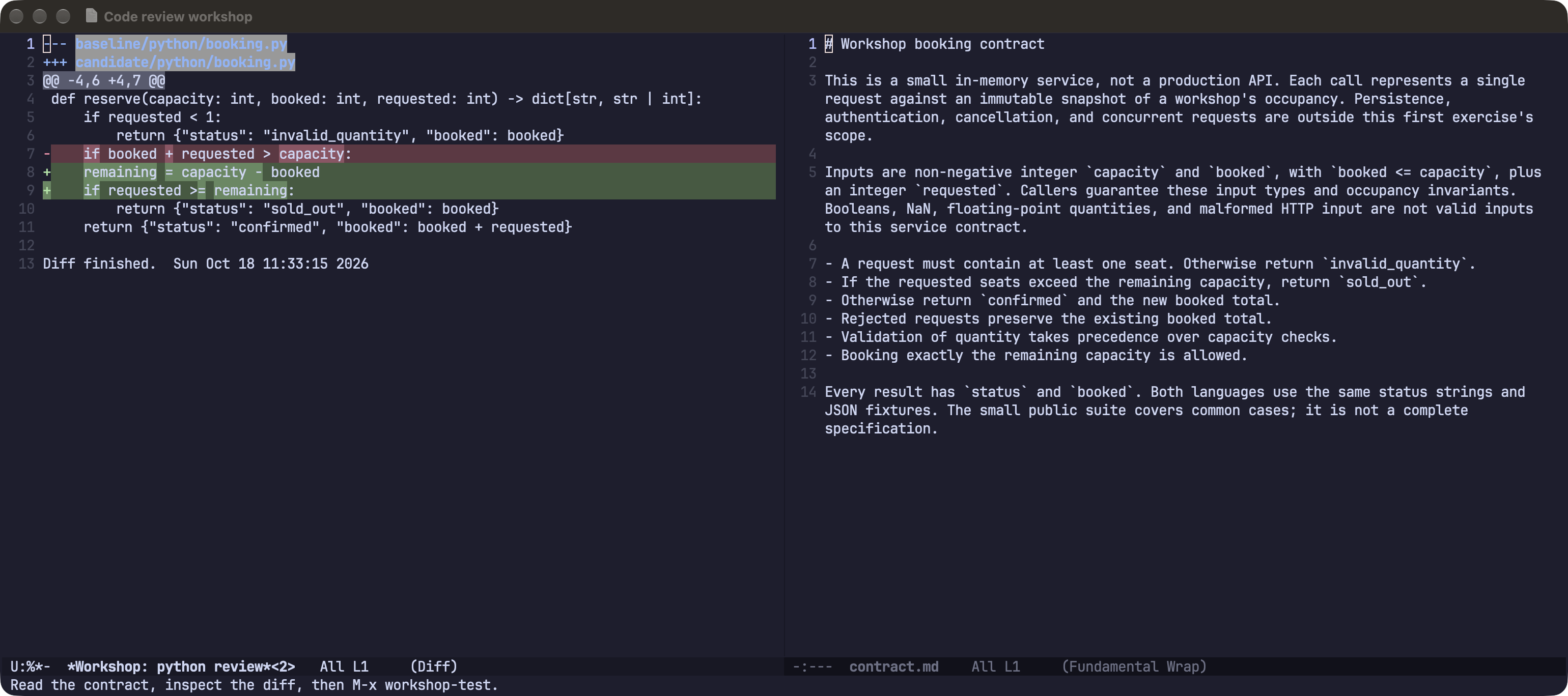
Open the Python screenshot at full size.
The changed condition is visible beside the specification it must satisfy. Keep both in view while investigating a claim.
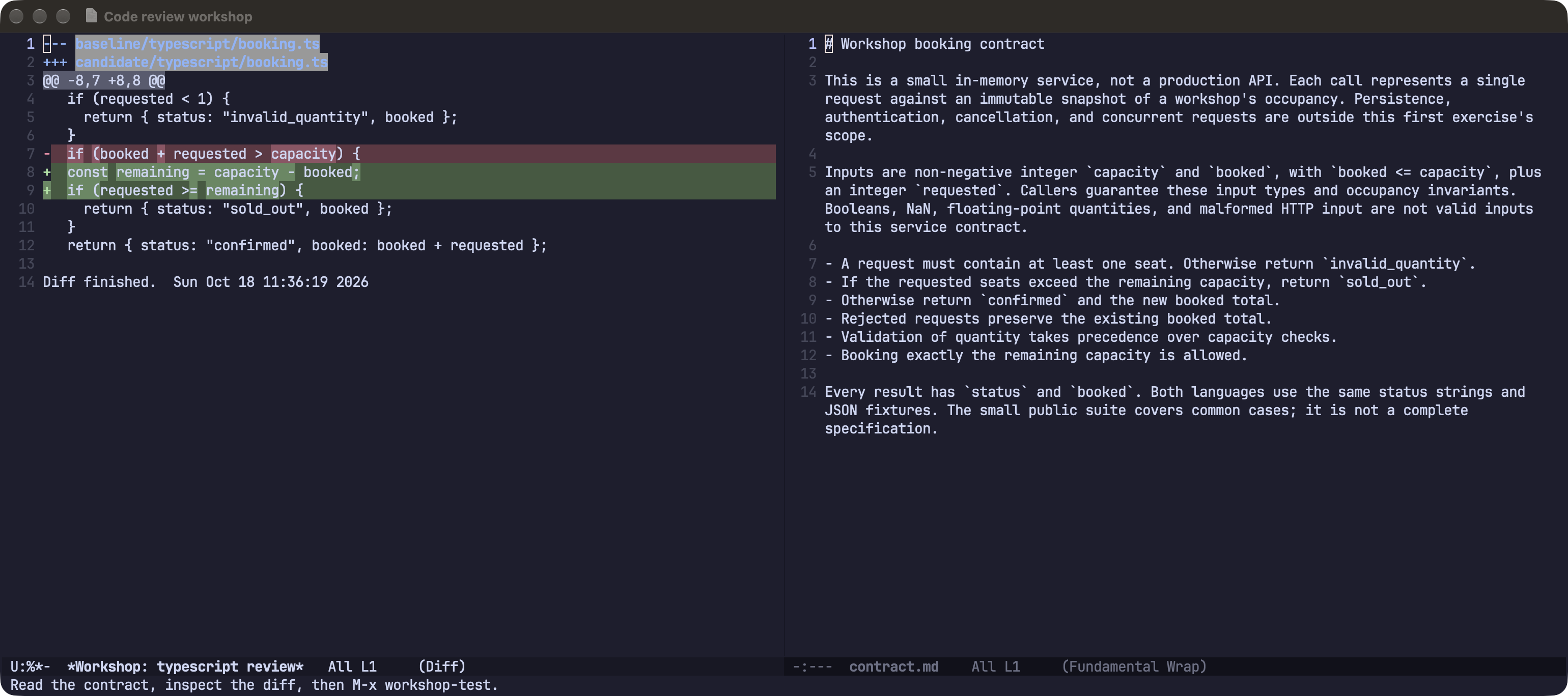
Open the TypeScript screenshot at full size.
Start with the local exercise
Open this repository with C-x C-f. In Doom’s Evil normal state, use SPC for the leader menu; M-x lets you invoke commands by name regardless of your bindings.
Use M-x ediff-files to compare the baseline booking.py or booking.ts against the corresponding Review A snapshot. Ediff compares files without requiring a published GitHub PR. Quit its control panel with q after inspecting the changed condition.
Open the service contract in another window. Use C-x 2 to split a window and C-x o to move between windows. Caleb’s config also maps C-h/j/k/l to directional window movement in normal mode.
Use M-x compile to run the test command for your chosen track from the repository root. Run it once for the baseline and once with BOOKING_VARIANT=capacity as shown in Review A. Record which variant produced each result.
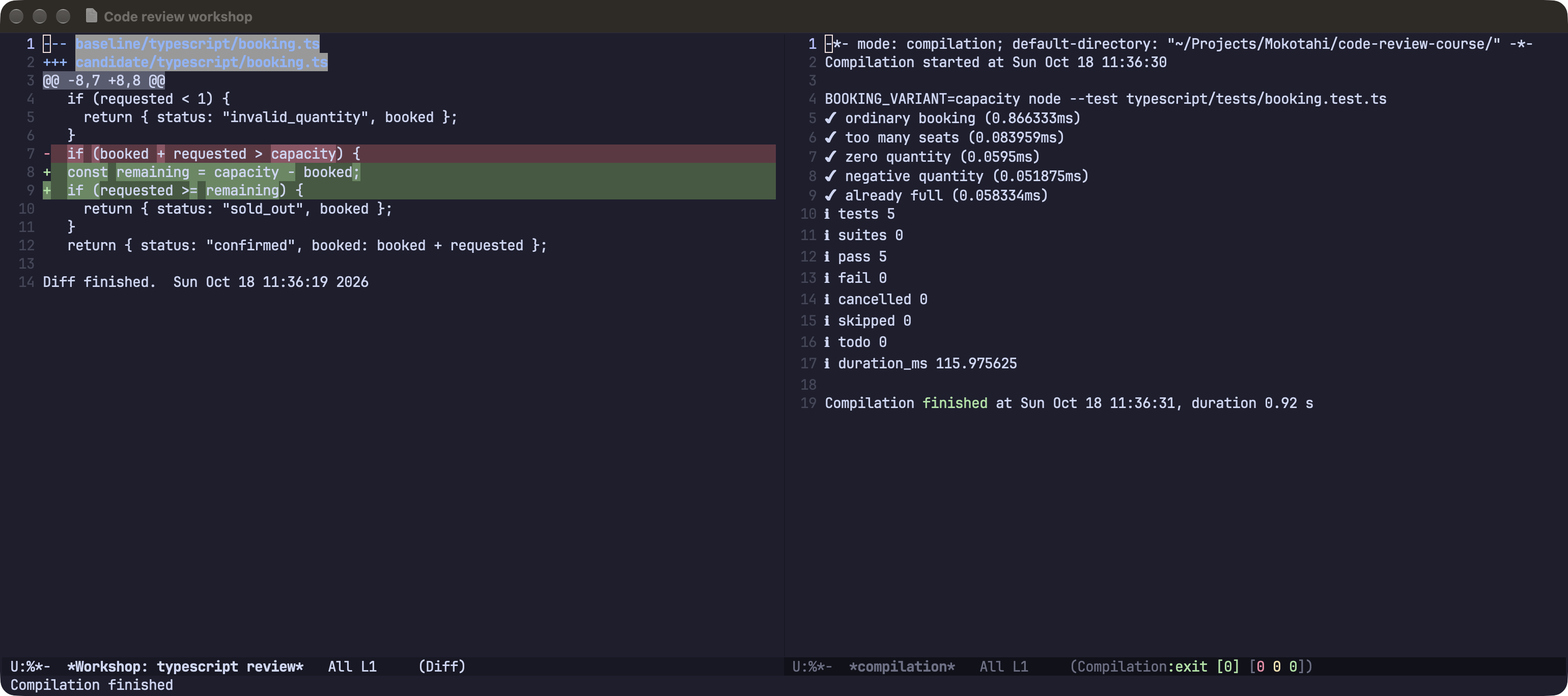
Open the test output at full size.
The candidate’s tests pass even though the boundary defect remains. Test output is evidence about the covered examples, not a substitute for reading the contract.
Keep an evidence notebook
Create a local Org file outside the exercise snapshots:
* Review A
** Scope
Baseline: python/booking.py (or typescript/booking.ts)
Candidate: exercises/01-capacity/...
Contract: fixtures/contract.md
** Intended behaviour
** Questions
** Evidence
Input / expected / actual / command / variant
** Decision
** Unresolved
The file comparison is the local equivalent of a PR diff. With real commits, also record the base and head SHAs. A branch name alone can change while you review.
Use the configured GitHub workflow
The dotfiles enable (magit +forge), pr-review, and claude-code-ide with the Ghostel terminal backend. They also enable Org and language support for Python and TypeScript/JavaScript.
| Action | Caleb’s binding | Command |
|---|---|---|
| Open PR by URL | SPC g v v | pr-review |
| Search PRs | SPC g v s | pr-review-search |
| Show changed-file sidebar in PR buffer | , f | +pr-review/files-sidebar |
| Start Claude for this PR | , c | +pr-review/claude |
| Start/toggle Claude | SPC a c | claude-code-ide |
| Open local Git status | M-x magit-status | magit-status |
The shell helper prr opens the current branch’s PR; prr 123 opens a numbered PR and prr <url> opens a URL. These depend on the helper from the dotfiles being loaded, gh being authenticated, and the Emacs packages being installed.
The custom , c command locates the local clone and asks Claude to read the PR through gh pr view and gh pr diff, then wait for your questions. It does not establish that the local checkout matches the PR head.
Before investigating local files, compare:
git status --short
git rev-parse HEAD
gh pr view <number> --json baseRefOid,headRefOid,url
If the head differs, use a separate checkout/worktree at the reviewed head before running candidate tests. Preserve any local edits. Re-check the head before finalising a review because the author may push another commit.
For this lesson, read and draft locally; no review submission is necessary.
Add AI after establishing context
Without a GitHub PR, start the configured Claude session using SPC a c and point it at the baseline, exercise snapshot, and contract. Ask it to investigate one question from your notebook. Record whether it inspected the same files and variant as you.
If the integration is unavailable, use lesson 1’s recorded response. The review exercise remains fully usable.
Avoid copying the entire dotfiles setup into an existing configuration. The supplied minimal setup has been tested with emacs -Q on Emacs 31.1, including diff navigation, an Org notebook, and a real TypeScript test run. The optional Doom integrations are documented from the existing configuration; this course does not require a fresh Doom installation or a hosted model account.
Checkpoint
You can open the diff, reach the complete source, run tests against the intended variant, and explain the evidence behind one finding. Save your notebook. Continue with lesson 3 to build a behaviour map before asking AI to hunt for defects.
← 1. Which comments would you leave? · 3. Understand the change before hunting bugs →